
MUSIC NATION SMTOWN META-PASSPORTに関するご案内
2023年7月22日(土)に開催される「2023 ZHOUMI Fanmeeting in Tokyo『Falling Love』」の会場でMUSIC NATION SMTOWN META-PASSPORTデジタルスタンプサービスを実施いたします。
MUSIC NATION SMTOWN META-PASSPORTアプリでは、SMエンタテインメント所属アーティストのライブ及びイベントにご来場いただくことで、各公演のオリジナルスタンプをデジタルで記録できます!
ぜひSMTOWN META-PASSPORTアプリをダウンロードし、自分だけのオリジナルパスポートを作ってみてください♪
[DIGITAL STAMPサービス実施公演]
・2023年7月22日(土)@山野ホール
※注意事項
- デジタルスタンプ取得可能時間と位置については、SMTOWN告知ページにてご確認ください。
- 上記会場ではMUSIC NATION SMTOWN META-PASSPORTブースの展開はございません。
既存のMUSIC NATION SMTOWN PASSPORTデジタル切り替えサービス及び実物スタンプの提供もございませんので、あらかじめご了承ください。
<MUSIC NATION SMTOWN>
https://www.smtown.com/notice
[DIGITAL STAMPの取得]
オフライン公演ごとにデジタルスタンプを取得できます。
SMTOWN META-PASSPORTアプリでアプリカメラ(スタンプマーク)を選択し、位置情報の認証後、デジタルスタンプをお受け取りください。
※スマートフォン上の「位置情報サービス」の使用を許可に設定のうえ、ご利用をお願いいたします。
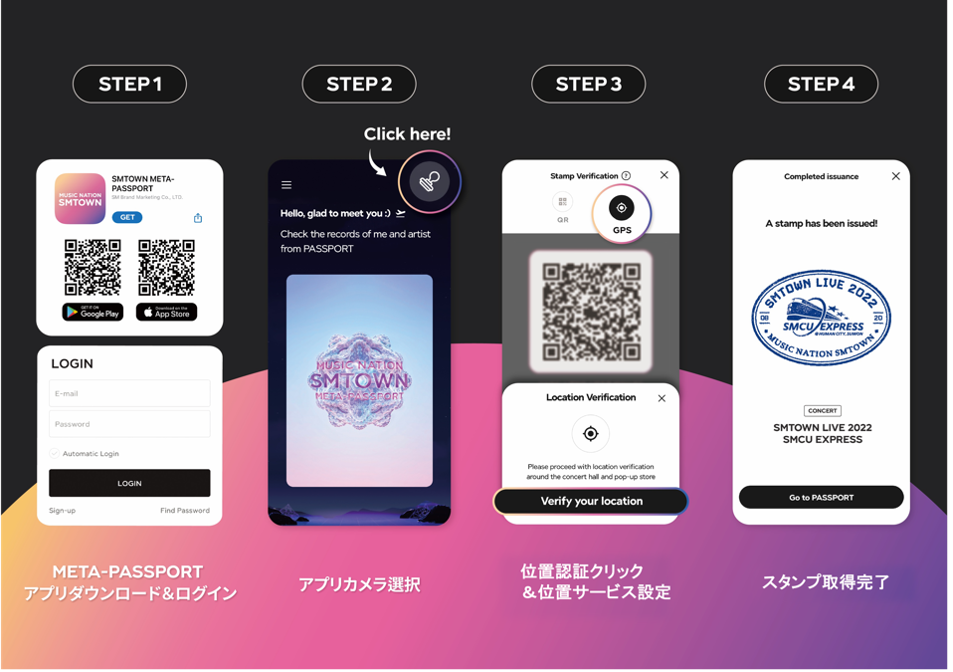
[デジタルスタンプ取得の流れ]
Step1. 「SMTOWN META-PASSPORT」アプリをダウンロードし、SMTOWNアカウントでログイン
ダウンロードはこちら▼
App Store (iOS) https://bit.ly/AppStore_META-PASSPORT
Google Play (Android) https://bit.ly/META-PASSPORT
Step2. アプリのメイン画面右上のスタンプマークを押す
Step3. 位置認証(GPS)マークを押して、位置情報サービスの使用を許可
Step4. スタンプの受け取り完了!
受け取ったデジタルスタンプは、ホーム画面のパスポートをタップしてご確認いただけます。
[MUSIC NATION SMTOWN PASSPORTのデジタル切り替え認証]
2012年以降、紙で発行していた現物のMUSIC NATION SMTOWN PASSPORTのデジタル切り替えサービスが、META-PASSPORTアプリから申請可能となりました!
[デジタル切り替え申請の流れ] ※申請ページ内にあるガイド動画も、あわせてご参照ください。
Step1. SMTOWN META-PASSPORTアプリ内 マイページから、「PINK-PASSPORT Convert to Digital PINK-PASSPORT」を選択
Step2. スマートフォン上の画面収録をスタート
Step3. SMTOWNアプリを開き、マイページにログイン(メールアドレスがはっきりと確認できるようにしてください)
Step4. スマートフォンのカメラを開き、MUSIC NATION SMTOWN PASSPORT会員情報ページを写真撮影
Step5. MUSIC NATION SMTOWN PASSPORT会員情報ページにあるバーコード部分を切り取り
Step6. 会員情報ページからスタートし、スタンプが押されている全てのページを2秒間ずつ撮影
Step7. 画面収録を終了
Step8. 「画面収録ビデオ」と「MUSIC NATION SMTOWN PASSPORT会員情報ページの写真」を申請ページにてアップロードし、申請完了!
※注意事項
- 画面収録の際は、動画が途切れないようにご注意ください。
- スタンプ撮影の際は、画面がブレないようになるべく近くで撮影してください。
- デジタル切り替えを申請するパスポートの会員情報ページ画像と、スタンプページの撮影映像は各々アップロードしてください。
- 申請したIDでピンクパスポートが発行されます。すでに発行済みのパスポートは他のアカウントへ移行およびキャンセルは不可となります。
- デジタル切り替えが完了したMUSIC NATION SMTOWN PASSPORTの再申請はできません。
[MUSIC NATION SMTOWN META-PASSPORTに関するお問い合わせ]
お問い合わせ先:metahelp@smtown.com
*本件に関して、SUPER JUNIORオフィシャルホームページやSMTOWN OFFICIAL JAPAN、または会場へお問い合わせいただいてもご対応いたしかねます。
MUSIC NATION SMTOWN META-PASSPORTアプリでは、SMエンタテインメント所属アーティストのライブ及びイベントにご来場いただくことで、各公演のオリジナルスタンプをデジタルで記録できます!
ぜひSMTOWN META-PASSPORTアプリをダウンロードし、自分だけのオリジナルパスポートを作ってみてください♪
[DIGITAL STAMPサービス実施公演]
・2023年7月22日(土)@山野ホール
※注意事項
- デジタルスタンプ取得可能時間と位置については、SMTOWN告知ページにてご確認ください。
- 上記会場ではMUSIC NATION SMTOWN META-PASSPORTブースの展開はございません。
既存のMUSIC NATION SMTOWN PASSPORTデジタル切り替えサービス及び実物スタンプの提供もございませんので、あらかじめご了承ください。
<MUSIC NATION SMTOWN>
https://www.smtown.com/notice
[DIGITAL STAMPの取得]
オフライン公演ごとにデジタルスタンプを取得できます。
SMTOWN META-PASSPORTアプリでアプリカメラ(スタンプマーク)を選択し、位置情報の認証後、デジタルスタンプをお受け取りください。
※スマートフォン上の「位置情報サービス」の使用を許可に設定のうえ、ご利用をお願いいたします。
[デジタルスタンプ取得の流れ]
Step1. 「SMTOWN META-PASSPORT」アプリをダウンロードし、SMTOWNアカウントでログイン
ダウンロードはこちら▼
App Store (iOS) https://bit.ly/AppStore_META-PASSPORT
Google Play (Android) https://bit.ly/META-PASSPORT
Step2. アプリのメイン画面右上のスタンプマークを押す
Step3. 位置認証(GPS)マークを押して、位置情報サービスの使用を許可
Step4. スタンプの受け取り完了!
受け取ったデジタルスタンプは、ホーム画面のパスポートをタップしてご確認いただけます。
[MUSIC NATION SMTOWN PASSPORTのデジタル切り替え認証]
2012年以降、紙で発行していた現物のMUSIC NATION SMTOWN PASSPORTのデジタル切り替えサービスが、META-PASSPORTアプリから申請可能となりました!
[デジタル切り替え申請の流れ] ※申請ページ内にあるガイド動画も、あわせてご参照ください。
Step1. SMTOWN META-PASSPORTアプリ内 マイページから、「PINK-PASSPORT Convert to Digital PINK-PASSPORT」を選択
Step2. スマートフォン上の画面収録をスタート
Step3. SMTOWNアプリを開き、マイページにログイン(メールアドレスがはっきりと確認できるようにしてください)
Step4. スマートフォンのカメラを開き、MUSIC NATION SMTOWN PASSPORT会員情報ページを写真撮影
Step5. MUSIC NATION SMTOWN PASSPORT会員情報ページにあるバーコード部分を切り取り
Step6. 会員情報ページからスタートし、スタンプが押されている全てのページを2秒間ずつ撮影
Step7. 画面収録を終了
Step8. 「画面収録ビデオ」と「MUSIC NATION SMTOWN PASSPORT会員情報ページの写真」を申請ページにてアップロードし、申請完了!
※注意事項
- 画面収録の際は、動画が途切れないようにご注意ください。
- スタンプ撮影の際は、画面がブレないようになるべく近くで撮影してください。
- デジタル切り替えを申請するパスポートの会員情報ページ画像と、スタンプページの撮影映像は各々アップロードしてください。
- 申請したIDでピンクパスポートが発行されます。すでに発行済みのパスポートは他のアカウントへ移行およびキャンセルは不可となります。
- デジタル切り替えが完了したMUSIC NATION SMTOWN PASSPORTの再申請はできません。
[MUSIC NATION SMTOWN META-PASSPORTに関するお問い合わせ]
お問い合わせ先:metahelp@smtown.com
*本件に関して、SUPER JUNIORオフィシャルホームページやSMTOWN OFFICIAL JAPAN、または会場へお問い合わせいただいてもご対応いたしかねます。